Cleaning up stopped EIPs instances is a crucial maintenance task for AWS accounts to avoid unnecessary costs associated with EIP instances not attached to a resource. To streamline this process, I’ve set up two versions of a Lambda function to automate the identification and deletion of stopped instances.
Each week, one version of the Lambda function runs on Thursday to inspect stopped instances and log them for review, while another version runs on Saturday to delete the identified instances. This two-phase approach allows time to verify what instances are flagged for deletion before executing the cleanup.
Amazon EventBridge
To run the Lambda function on a specific day, you can use Amazon EventBridge (formerly CloudWatch Events). EventBridge allows you to create a scheduled rule that triggers the Lambda function at a specific time.
- Navigate to EventBridge in the AWS Management Console.

- Create a Rule:
- Set the rule type to Schedule.

- Define the cron expression or rate expression for the desired schedule. For exam

- To run at 7 AM every Thursday:
cron(0 7 ? * 5 *) - This cron expression means: "At 07:00 AM UTC on every Thursday."
- Set Target to your Lambda function.
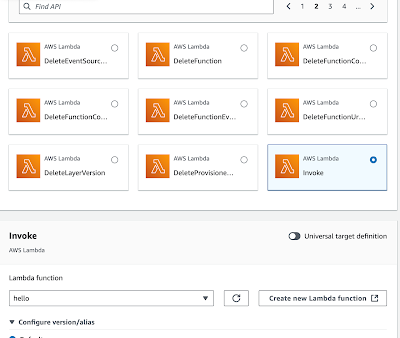
Step 2: Pass a Specific Set of Environment Variables
To use specific environment variables for a particular run:
Use AWS Lambda Versions and Aliases:
- You can create different versions of the Lambda function, each with its own set of environment variables.
- For example, you can create a version with inspection variables (
DELETE_QUEUES=False) and another with deletion variables (DELETE_QUEUES=True). - Assign an alias to each version (e.g.,
inspection and deletion).
EventBridge Rule Target Configuration:
- In the target configuration of the EventBridge rule, specify the alias for the Lambda version you want to run.
- This allows you to run different versions of the Lambda function based on the schedule.
Step 3: Use Code Variables
If you need to dynamically set environment variables for each run:
Update Environment Variables in Code:
- Modify the Lambda function code to accept environment variable overrides via the event payload.
import os
def lambda_handler(event, context):
delete_queues = event.get('DELETE_QUEUES', os.getenv('DELETE_QUEUES', 'True')).lower() == 'true'
send_slack_message = event.get('SEND_SLACK_MESSAGE', os.getenv('SEND_SLACK_MESSAGE', 'True')).lower() == 'true'
- Create implementations of EventBridge with different versions of the code and variables:
- Assuming you already have a Lambda function that checks for non-running EC2 instances and deletes them if required, you’ll need to create two separate versions:
- Version 1: For inspection (running every Thursday, without deleting).
- Version 2: For deletion (running every Saturday, with deletion enabled).
Version 1 of my code ONLY sends a slack notification
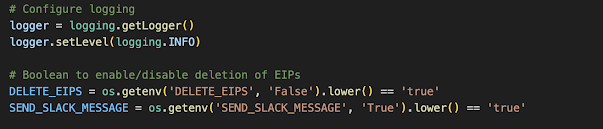
Version 2 of my code sends slack notifications AND deletes the instances
Step 4: Use Environmental Variables
These changes can also be done through the environment variables within the lambda job. (within the lambda function go to configuration-> environment variables)
By managing environment variables at the Lambda function level, you maintain a clear separation between inspection and deletion tasks, making it easy to configure and schedule them appropriately.


